Caterpillar 246C, 256C, 262C, 272C, 277C 2012 Service Manual
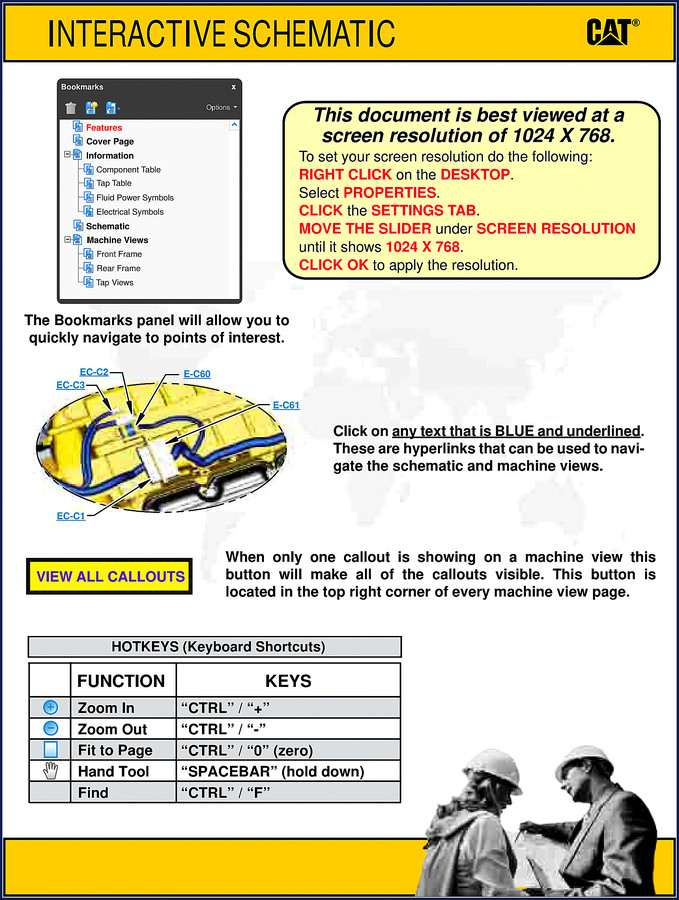
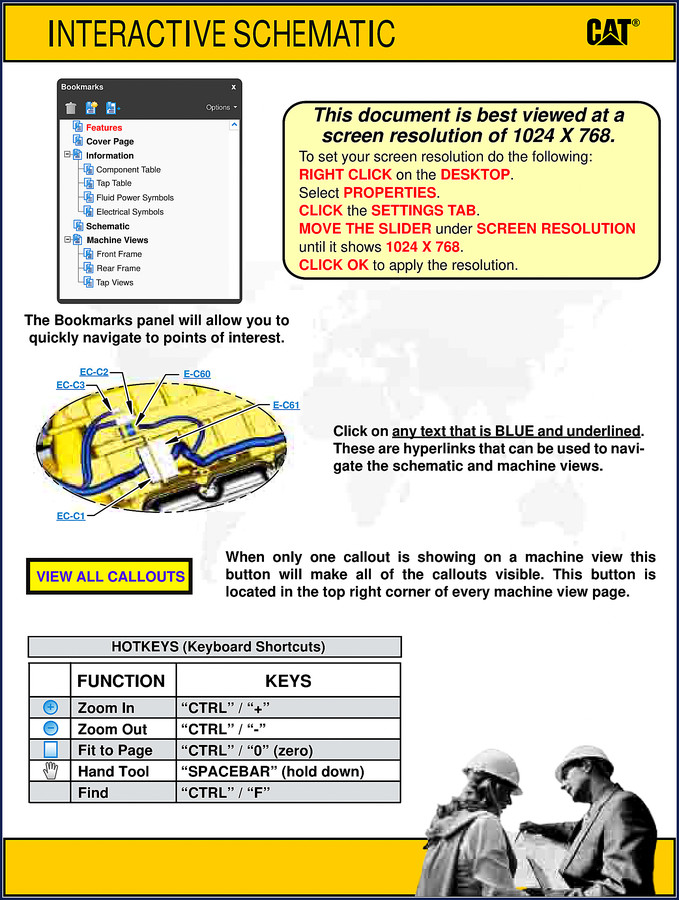
I’ve had three guys this month walk into my shop holding aftermarket printouts for a 272C that didn’t have the right CID/FMI cross-reference. One of them had a shorted alternator sense wire because the generic diagram showed the wrong connector location. That’s the kind of billable hour you never get back. This Caterpillar 246C, 256C, 262C, 272C, 277C 2012 Service Manual is the same PDF Caterpillar puts on their dealer network. It splits the electrical system into two volumes—Engine and Cab—so you can trace a fault without flipping through cab schematics when you’re under the hood. 15 pages of factory-original content, no third-party re-drawing.
Component Location and Connector Diagrams
Volume 1 of 2 (Engine) lists every sensor, solenoid, and relay with a grid coordinate. Need the hydraulic temperature sensor? It’s at G-7 on the schematic, location 6 on the machine view. The table on page 3 shows the 12V battery at H-12, the glow plugs at F-11, and the fuel priming pump motor at H-7. If you’re chasing an intermittent no-start, you can find the cold start advance solenoid at C-13, location 23. That’s real data, not a translation guess. The connector location section gives you the exact harness junction—again split by volume so you don’t waste time opening the cab diagram for an engine-side fault.
Electrical Schematics – Volume 2 of 2 (Cab)
The cab volume covers the HVAC resistor (H-4), backup alarm (F-10), and the Product Link control (E-1). Every wire color and pin number is factory-stamped. I’ve seen aftermarket schematics mislabel the A/C compressor relay as a fan relay—this one doesn’t. The interactive PDF lets you click blue hyperlinks to jump from the schematic to the machine view. Page 2 of the manual lists the complete serial number ranges (JAY2116-UP, DWS1581-UP, etc.) so you can confirm your machine matches. None of that “fits all models” nonsense.
Torque Specs and Fluid Capacities
You won’t find a bolt torque table in the main TOC because this is an electrical-focused supplement. But the “Specification and Related Manuals” section on page 1 references the engine and cab volumes separately—pointing you to the correct engine service manual for head bolt torque. If you need the main power fuse rating, it’s called out on schematic I-8. For fluid capacities, you’ll want the Caterpillar 246C 256C 262C 272C 2012 Service Manual (the full mechanical version). Always cross-reference two sources before torquing anything on a Cat.
3 Reasons to Use OEM Documentation
One: The CID/MID/FMI tables in the Information section are pulled straight from Caterpillar’s ET tool. Aftermarket versions often combine model years or omit codes for the 277C. Two: The standard electrical symbols match the actual harness labels on the machine. I’ve diagnosed a short on a 256C in fifteen minutes using the connector location coordinates—no guessing which plug is which. Three: This manual includesProduct Link GPS radio locations (E-3 on cab schematic) that vanish from many aftermarket copies. If you’re rebuilding an ex-rental 246C with optional GPS, you need that data.
Home mechanics wrenching on a 262C in their own garage can follow along fine, provided you already own basic electrical tools like a DVOM. The diagrams assume you know what a normally open relay looks like. Beginners shouldpair this with Caterpillar’s operator manual first. For pros charging by the hour, the machine view callouts and hyperlink navigation will cut diagnostic time. I run a six-bay shop; I print the engine schematic page and post it on the wall when I’ve got a 287C with a blown starter relay. The 2012 date matters—later machines swapped the Product Link module, so don’t assume this covers a 277C2 (that’s a separate serial range).
Source Validity: Factory PDF, Not a Re-Scan
This isn’t a photocopy of a photocopy. The file is an interactive PDF with real bookmarks and hyperlinks. Caterpillar watermarked it © 2012 with a printed U.S.A. origin. I’ve downloaded aftermarket “factory” manuals that were missing the entire Standard Electrical section—this one has it all. The 15-page count is deliberate: electrical diagnostics don’t need 500 pages. You get the exact component/connector tables, schematic grid overlays, and machine views. That’s it. If you’re looking for a mechanical overhaul, you need the engine volume separately. The related manual Caterpillar 246C 256C 262C 262C2 272C 2012 Service Manual covers the mechanical side. For training purposes, I’d also check Caterpillar 246C 256C 262C 272C 277C 2008 Training Manual – OEM Specs because the 2008 edition includes additional troubleshooting logic.
I don’t trust third-party manuals. Ever. When a customer’s machine is down and the part store says “this should work,” I grab the factory spec. On these C-series loaders, the Manual Transmission of skill and a factory diagram beats any guesswork. And if you’re chasing a no-start on a 272C, the starter motor location (H-12) and the relay (G-12) are right there on page 3. Don’t waste an afternoon tracing wires that aren’t even the right color. Manual Transmission? No—this is manual electrical diagnostics the way it should be done.
FAQ
- Does this manual include torque specs for the engine head bolts?
- No. This is an electrical service manual. Torque specs are in the engine volume of the service manual (referenced under “Specification and Related Manuals”). You need the full mechanical manual for that data.
- Can I use this for a 277C2 or 287C2?
- Only if the serial number falls within the ranges listed on page 2. 277C2 starts at MET1-UP and is not covered here. The 2012 edition covers only the first-generation C-series.
- How many pages are dedicated to the cab schematics?
- The entire volume 2 of 2 (Cab) runs about half the document—roughly 7–8 pages covering connector locations, component tables, and the cab schematic. Total is 15 pages.
- Is this a PDF I can download immediately, or is it a printed book?
- It’s a digital PDF file. You download it after purchase. No shipping, no waiting. Works on tablets and laptops—just set your screen resolution to 1024×768 per the manual instructions on page 1.
After two decades of wrenching on Cats, I’d rather trust the factory file than a stack of aftermarket paper. Download the Factory Manual from AutoRepairManuals and put the right schematic on your workbench today.


Reviews
There are no reviews yet.