Caterpillar 246C, 256C, 262C, 272C, 262C2 2012 Service Manual (Hydraulic System)
If you’re stuck with a hydraulic system that won’t lift on a Caterpillar 246C, 256C, 262C, 272C, 262C2 2012 Service Manual and you’re flipping through a generic repair manual, stop. You need the factory document. This 30-page service manual from 2012 gives you the exact schematics and component locations for the 246C, 256C, 262C, 262C2, and 272C skid steer loaders. I’ve seen techs spend hours checking the wrong pump because they didn’t have the tap location diagram. Don’t be that guy.
Caterpillar 246C, 256C, 262C, 272C, 262C2 Service Manual – What’s Inside
This PDF is not a full machine service manual – it’s the hydraulic system supplement. But that’s what you need when the implement circuit is dead. The bookmarks list Features, Cover Page, Information (Component Location, Tap Location, Fluid Power Symbols, Electrical Symbols), Schematics, and Machine Views. Each section is split into Volume 1 (Standard Flow) and Volume 2 (XPS High Flow). That means whether you have a standard 246C or an XPS 272C, the data is there.
Hydraulic System Schematics – Standard Flow and XPS High Flow
Manufacturers like Caterpillar don’t publish vague diagrams. The schematics section contains Volume 1 of 2 – Standard Flow and Volume 2 of 2 – XPS High Flow. You get the exact routing of hoses, pumps, motors, and valves. The Machine Views show component locations with grid coordinates. For example, the Hystat Pump for a 246C is at grid B-8 (page 3). That level of detail saves you from tearing half the machine apart.
Electrical Symbols and Fluid Power Symbols
You’ll find a dedicated page for Fluid Power Symbols and another for Electrical Symbols. If you can’t read a symbol, you’ll misdiagnose. This manual gives you the legend used by Caterpillar. The Electrical section uses standard ISO symbols, but the hydraulic symbols are specific to Cat. I’ve had to explain to junior techs that the dash-dot line means pilot pressure – it’s all in here. For more background on general electrical schematics, you can check the Manual Transmission article on Wikipedia, but for Cat-specific wiring, use this manual.
6 Models Covered in One Service Manual
That’s right – the 246C (JAY1-UP), 256C (DWS1-UP), 262C (MST1-UP), 262C2 (TMW1-UP), and 272C (RED1-UP) are all in this single 30-page PDF. Each model has its own serial number range. The machine views include separate diagrams for each model where parts differ. For instance, the Implement Pump location differs between the 246/256 and the 272. You get the grid coordinates for each.
Where Are the Pressure Taps Located?
Common question. The Tap Location section (under Information) gives you the exact pressure tap points for both Standard Flow and XPS High Flow. For the Hystat Pump, there are separate diagrams for Standard Flow and XPS. Page 3 of the manual shows the Pressure Taps – Hystat Pump (Standard Flow) with grid coordinates. No guessing – you connect your gauge to the right tap the first time.
Stick with the Factory Caterpillar Publication
Aftermarket hydraulic diagrams are often generic or redrawn from memory. They miss the nuance of the XPS high-flow system. This is a direct scan of the original Caterpillar publication from 2012. It’s not a reprint – it’s the OEM file. When I need to trace a demand fan motor circuit on a 262C2, I go to the factory sheet, not a third-party copy. Related manuals you might need: Caterpillar 246C 256C 262C 272C 2012 Service Manual, Caterpillar 246C 256C 262C 272C 277C 2012 Service Manual, and Caterpillar 246C 256C 262C 272C 277C 2008 Training Manual – OEM Specs.
- Does this manual cover the engine?
- No, this is strictly the hydraulic system service manual – 30 pages focused on the hydraulic schematics and component locations.
- How do I navigate the interactive schematic?
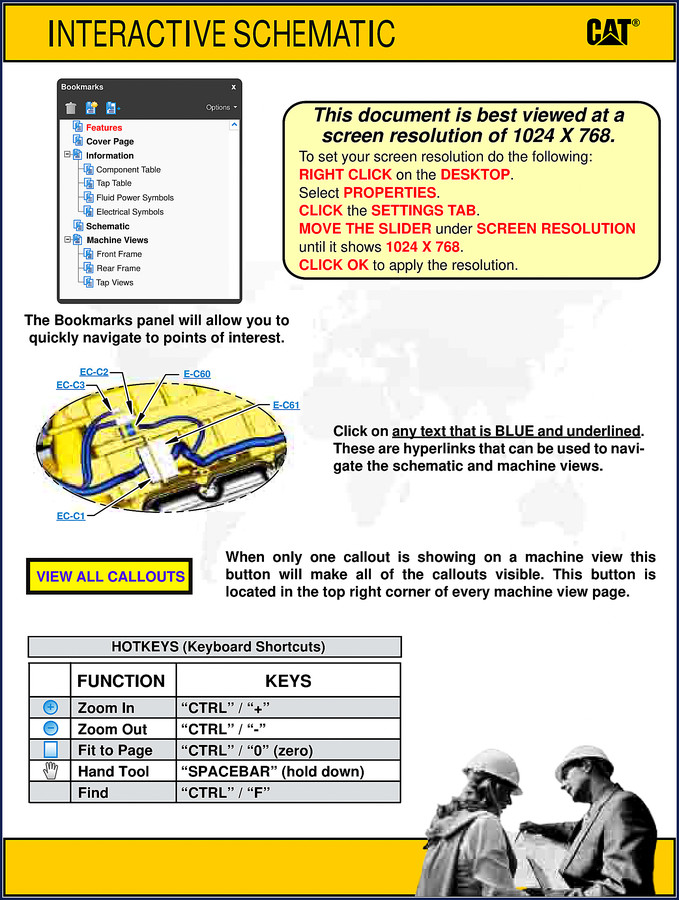
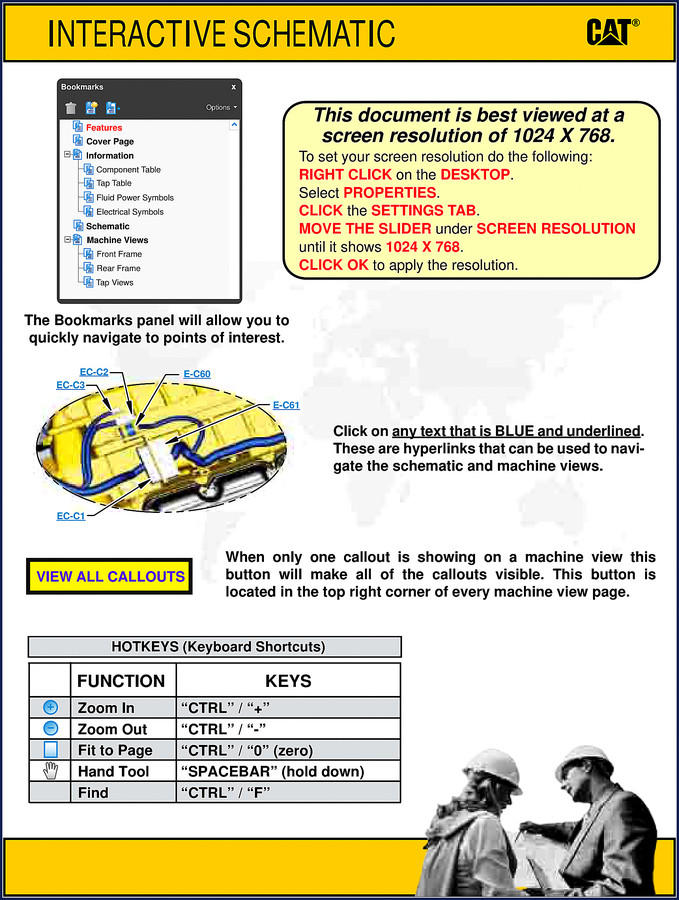
- The PDF uses interactive bookmarks and hyperlinks. On page 1, you’ll see instructions for setting screen resolution to 1024×768. Click on any blue underlined text to navigate. The Bookmarks panel on the left lets you jump to Component Location, Schematics, Machine Views. Each machine view has callouts – use the ‘VIEW ALL CALLOUTS’ button to see all part labels. Hotkeys include CTRL+ for zoom, SPACEBAR for hand tool. This is much faster than flipping paper pages, especially when you’re greasy in the shop. Also, if you need more general knowledge on power transmission, the Manual Transmission Wikipedia page is a good resource, but for this machine, stick to the Cat data.
This PDF is the real deal. You can download and start using it right away. If you want to fix that hydraulic issue on your 246C or 272C correctly, Download the Factory Manual now.




John D. –
I am extremely satisfied with this purchase. It is very easy to read on my laptop without blur. Every torque spec is provided for Caterpillar 246C. Saves me so much money.
pro_mechanic –
This is exactly what I required. Immediate link after payment. Every wiring layout is provided for Caterpillar 246C. I will definitely buy again.
Richard G. –
This is just what I required. The scan is high-quality and well indexed. Every torque spec is included for Caterpillar 246C. Saves me a lot of dollars.