
Zoomlion RT55 2013 Operators Manual
If you are running a Zoomlion RT55 rough terrain crane and you don’t have the factory Zoomlion RT55 2013 Operators Manual, you are working blind. I’ve seen too many operators skip the book and then wonder why the swing function acts up or why the deadman switch won’t hold. This is the manual that comes from the factory – 173 pages of direct instruction, not some aftermarket copy. It covers the RT55 and, per the OCR note on page 4, also applies to the RT60 for the US market. That alone tells you the data is solid.
Let’s get into what matters: the actual content. The table of contents shows nine chapters, starting with safety (Chapter 4) and moving through operating conditions, controls, procedures, transport, and general info. Nothing wasted – just the steps you need to keep that crane running and keep yourself alive.
RT55 Controls and Instruments: Chapter 6 Breakdown
Chapter 6 is the heart of this manual. It covers every control in the cab – the swing/aux winch joystick, boom hoist/main winch control, deadman switch, horn, free swing, boom extend/retract pedal, steering wheel with hydraulic booster, gear selector, parking brake switch, hazard lights, wiper control (4-speed plus washer), brake pedal, ignition switch (4 positions), throttle pedal, hand throttle, bubble level, and even the cigarette lighter. If you have ever fumbled for the right lever when the load is swinging, this chapter saves you the guesswork. Page 5 shows the hazard indicator symbols you see on those controls, so you understand the warnings before you touch anything.
Does This Manual Cover the RT60 as Well?
Yes. The first page of the manual states that the Operator’s Manual for RT55 Rough Terrain Crane also covers RT60 for US market. That means if you are running an RT60, you get the same factory data without buying another book. The 2013 edition includes both models in the same 173-page document. Check the model number on your crane’s data plate to confirm, but Zoomlion explicitly included the RT60.
3 Critical Safety Chapters You Need to Read
Chapter 4 is all safety. Chapter 5 covers operating conditions and precautions. Chapter 9 has general information that includes maintenance safety. Do not skip these. The hazard indicators on page 5 explain the DANGER, WARNING, CAUTION, ATTENTION, NOTE, and IMPORTANT labels. If you misinterpret a red “DANGER” decal because you didn’t read the manual, that is on you. This manual tells you exactly what each label means and where it appears on the crane. I have seen too many close calls from guys who thought they knew better. Read the safety chapters – that is why they are there.
Get the Right Operating Procedure Before You Start
Chapter 7 is the operating procedures section. It walks you through start-up, daily checks, boom operation, winch operation, and shutdown. The manual uses imperative language – “Move the joystick forward to reel-off the aux winch rope.” Not “consider moving.” Not “you may want to.” This is the factory telling you exactly how to operate the crane. If you follow these steps in order, you reduce wear on the machine and eliminate most operator errors. The hand throttle procedure is covered after the HAND/FOOT THROTTLE SELECT SWITCH is activated – the manual tells you the sequence.
Hazard Indicators: Understanding the Warning System
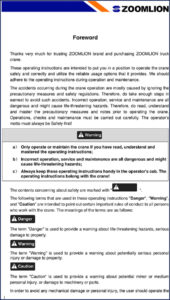
Page 5 in this manual breaks down the hazard indicator system. DANGER means death or injury. WARNING means possible death or injury. CAUTION means minor injury. ATTENTION means property damage. NOTE is a tip. IMPORTANT emphasizes data. The symbols are standardized throughout the manual and match the decals on the crane. If you ever see a symbol you do not recognize, flip to page 5. That is your legend. Do not operate the machine until you understand every symbol on that page. Manual Transmission – that term is not in this manual, but it reminds me: the gear selector in Chapter 6 works through a manual transmission, so know your gears before you shift.
Chapter 8 covers transport and storage. That includes the transmission in low range for towing – see Manual Transmission for general transmission operation.
Related Manuals
- Zoomlion QY30V532.4T/20Y Operators Manual – 276 Pages of Factory Specs
- Zoomlion ZCC1100H 2014 Operators Manual – Crawler Crane Lifting Charts
- ZOOMLION RT75 Rough Terrain Crane Operator’s Manual
- Does this manual apply to both the RT55 and RT60?
- Yes, the manual also covers the RT60 for the US market.
- What safety information is in Chapter 4?
- Chapter 4 details all hazard indicators — DANGER, WARNING, CAUTION, ATTENTION, NOTE, and IMPORTANT — and explains how they are used throughout the manual. It includes the specific symbols and what each means. Page 5 shows the full breakdown. If you skip this chapter, you might misinterpret a warning label on the crane and put yourself at risk. That’s not a gamble worth taking on a 55-ton machine.
- How do I operate the deadman switch?
- Push the switch to send command signals through the joysticks; push again to stop.
- Where can I find the boom extend/retract procedure?
- The boom extend/retract pedal is covered in Chapter 6 under ‘Control Devices and Instruments’. The manual gives the exact foot pedal location and how to modulate extend/retract speed. Don’t guess— read that section before you move the boom.
Stop working from memory or photocopies. If you operate a Zoomlion RT55 or RT60, you need this document in the cab. Download the Factory Manual now and put it where you can reach it – right next to the seat.



Reviews
There are no reviews yet.